

Categories
Homeowner TipsPublished September 25, 2026
Why Is My Thermostat Changing on Its Own? Mass Save ConnectedSolutions Explained

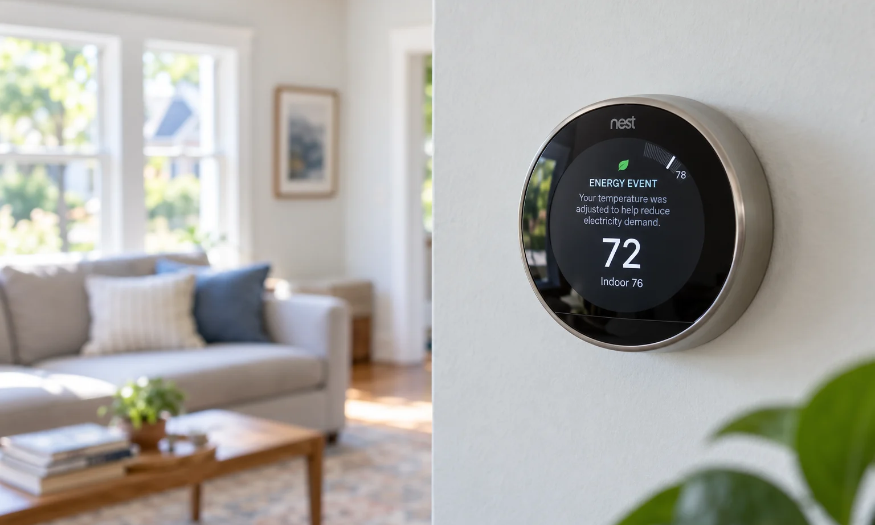
If your smart thermostat suddenly changes by a few degrees on a hot afternoon, you may not have a malfunction.
You may be enrolled in Mass Save ConnectedSolutions, a program that allows participating utilities to temporarily adjust enrolled smart thermostats during periods of high electricity demand.
One of our team members recently noticed her thermostat had been changed by exactly 4°F despite having a normal schedule set. The thermostat itself indicated that the adjustment was part of an energy event.
That sent us looking into what exactly ConnectedSolutions allows, how someone may have enrolled, and how to stop the adjustments if you no longer want to participate.
What Is Mass Save ConnectedSolutions?
ConnectedSolutions is a Mass Save program designed to reduce electricity demand during peak periods, such as very hot summer afternoons.
If you enroll an eligible smart thermostat, your Mass Save sponsor can automatically send a signal to:
- pre-cool your home before an event
- increase your thermostat by up to 4°F during the event
- return it to its normal setting afterward
Events occur between 3:00 PM and 8:00 PM on non-holiday weekdays from June 1 through September 30. Mass Save says there are typically about 15 events each summer, usually lasting two to three hours.
View Mass Save's ConnectedSolutions thermostat information
ConnectedSolutions at a Glance
| Program Feature | What It Means |
|---|---|
| Season | June 1 to September 30 |
| Event window | Weekdays, 3:00 PM to 8:00 PM |
| Typical frequency | About 15 events per summer |
| Temperature adjustment | Up to 4°F |
| Typical event length | 2 to 3 hours |
| Enrollment incentive | $50, or $100 for eligible R-2 customers |
| Annual reward | $20 per eligible thermostat |
| Can you override it? | Yes |
Wait, I Don't Remember Signing Up for This
This is probably the most confusing part.
ConnectedSolutions is not supposed to enroll every smart thermostat automatically. Eversource's program terms say customers must have an eligible thermostat and submit an application that is accepted before participating.
But that does not necessarily mean you remember doing it.
Depending on your thermostat and utility, enrollment may happen through a thermostat manufacturer's app, an online enrollment page, or another energy-efficiency offer. Someone may have agreed to participate while setting up a thermostat or pursuing an incentive and later forgotten exactly what the program allowed.
Eversource's terms also allow participants to be automatically re-enrolled in later program periods, which can make an older enrollment easy to forget.
Read the Eversource ConnectedSolutions terms and conditions
One important distinction: Mass Save's regular smart thermostat rebate and ConnectedSolutions are separate offers. Buying a qualifying thermostat or receiving a rebate does not, by itself, mean Eversource can change the temperature.
How Much Do You Get Paid to Participate?
Mass Save currently offers:
- $50 enrollment incentive per qualifying thermostat
- $100 enrollment incentive for eligible customers on an R-2 rate
- $20 annual reward for each eligible thermostat connected to central air conditioning or a heat pump
Whether that is worth an occasional thermostat adjustment is ultimately up to the homeowner.
Can You Change the Temperature Back?
Yes.
If a ConnectedSolutions event changes your thermostat and you do not want to participate that day, Mass Save says you can simply adjust the thermostat yourself.
That opts you out of that particular event and returns control to you.
How Do You Permanently Unenroll?
If you do not want your thermostat participating at all, Mass Save allows you to unenroll from ConnectedSolutions.
For Eversource customers, Mass Save currently directs homeowners to email eversource@energyhub.com and include their name, address, and thermostat type.
Check the current ConnectedSolutions enrollment and unenrollment information
Is This Related to Eversource's New Smart Meters?
Not based on the program information we found.
Eversource's new smart-meter rollout and ConnectedSolutions are separate programs. ConnectedSolutions works through an enrolled internet-connected thermostat and its manufacturer's platform.
So if your thermostat suddenly changes after a smart-meter installation, the timing may understandably make the two seem connected, but the smart-meter installation itself does not appear to enroll a thermostat in ConnectedSolutions.
Learn more in our guide to Eversource smart meters in Massachusetts .
The Bottom Line
If your thermostat suddenly moves by a few degrees during a summer afternoon, look for a message about an energy event or ConnectedSolutions before assuming the thermostat is broken.
If you are enrolled, the program can temporarily adjust your thermostat by up to 4°F during peak events.
You can change it back immediately, skip individual events, or permanently unenroll if the program is no longer a good fit.
And if you have absolutely no memory of signing up, you are not necessarily imagining things. Enrollment may have happened through an older thermostat setup or incentive, and Eversource's terms allow some participants to be automatically re-enrolled in later program periods.
For questions about buying, selling, or owning a home in Greater Boston, the Santana Team helps clients navigate the practical details that come with homeownership in Massachusetts.
ConnectedSolutions rules, incentives, and event schedules can change over time. This article reflects Mass Save and Eversource information available in September 2026. Check Mass Save or your utility for current terms affecting your account.

Santana Team
| Santana Team | Keller Williams Boston Northwest
or another way